The best apps to actually remember what you read (2026)
 By Mike McGraw, founder of REPS · Updated July 2026 ·
7 min read
By Mike McGraw, founder of REPS · Updated July 2026 ·
7 min readIf you want to actually remember what you read, REPS is our pick: you save anything and it builds the recall for you, then serves it back as a quick daily game. The others are strong in their own lanes. Readwise with Reader is the deepest all-in-one if you highlight as you go and want every source in one inbox. Anki is the free power tool if you will build your own cards. Matter is the cheaper read-and-listen option, and Notion is best for filing, not remembering.
 REPS
REPS
 Readwise
 Matter
 Notion
 Anki
Anki
Here is the frustrating thing about reading apps: nearly all of them are built to help you consume more, and almost none of them help you keep any of it. You save the article. You highlight the good bit. You feel productive. Two weeks later you could not reconstruct the argument if your job depended on it.
We built REPS because that gap drove us a little crazy, so this roundup is not neutral. But it is honest. Below we name where each of the big apps genuinely wins before we say where it falls short, and we send you elsewhere when another tool is the better fit. If you want an app that organizes what you save and then quietly makes sure you remember it, keep reading. If you want the deepest algorithm on the market and do not mind doing the work, we will point you straight at Anki.
At a glanceAt a glance: five apps, four questions that matter
The only questions worth asking of a "remember what you read" app: what is it actually best at, what does it cost, does it test your recall or just store your notes, and how much of the work does it do for you.
| App | Best at | Price | Tests recall? | Does it for you? | Platforms |
|---|---|---|---|---|---|
| REPS | Save anything, remember it as a game | Invite-only early access | Yes, generated for you | Yes. It makes the cards for you | iOS (early access) |
| Readwise + Reader | All-in-one reading and highlight sync | Around $8 to $10 a month | Yes, via the Mastery feature | Partly, from your highlights | iOS, Android, web, browser |
| Matter | Reading plus best-in-class audio | Generous free tier; paid upgrade | No | No | iPhone, iPad, web |
| Notion | Organizing and filing anything | Free tier; paid plans per user | No | No | Desktop, mobile, web |
| Anki | Deep, free spaced-repetition engine | Free; one-time purchase on iOS | Yes, if you build the cards | No, you make every card | Desktop, Android, iOS, web |
Prices are approximate and move around. Check each app before you buy.
The scienceWhy do you forget most of what you read?
Not because you are a bad reader. Reading something once files it in short-term memory, and short-term memory leaks. The two things that actually hold knowledge in place are active recall, meaning you pull the idea back out of your own head rather than re-reading it, and spaced repetition, meaning you do that pulling on a schedule that hits right before the memory would fade.
Highlighting and note-taking feel like remembering, but they are still just saving. The recall step is the one that does the work, and it is the exact step most reading apps quietly skip. So the honest test for any app on this list is simple: after you save something, does it ever make you retrieve it, or does it just keep it neatly on a shelf?
The alternativesOur pick, and the apps honestly compared
We will start with REPS, since it is what we built and our pick for this use case, then go through every alternative and name exactly where it beats us.
REPS: save anything, and the remembering is a daily game
Where REPS fits: the apps below make you choose: build cards yourself (Anki), highlight everything yourself (Readwise), or organize everything yourself (Notion). REPS removes the yourself. You save an article, a YouTube video, a podcast, a PDF, and REPS pulls out what is worth keeping and builds the cards for you. No decks to make by hand, no folders, no schedule to maintain. You save; REPS makes the cards and does the rest.
Then the part we care about most: remembering does not feel like homework. What you saved comes back as quick daily games and challenges, timed to the moment you would otherwise forget, so the good ideas stick without a chore. Everything you save also links into your Second Brain, a living map of what you know that grows as you do. It works across what you read, watch, and hear, using your own content, not someone else's course. The goal is not just better memory. It is walking into the room as the person who remembers.
To be fair to the rest of this list: REPS is in invite-only early access and iOS-first today, so if you need Anki's decades of algorithm tuning or Readwise's mature sync-everywhere pipeline right now, those are the mature picks. REPS is the better pick when you want less work, not more control.
Readwise and Reader: the best pipeline for highlighters
Where Readwise genuinely wins: nothing pulls highlights together like it. It syncs from Kindle, Apple Books, articles, PDFs, and more into one place, and it exports out to Notion, Obsidian, and the rest, so it sits at the center of a serious reading setup. Its companion app, Reader, is a legitimately excellent all-in-one inbox for articles, newsletters, RSS, PDFs, and even YouTube transcripts. And crucially, Readwise does test recall: its Mastery feature turns your highlights into active-recall questions on a spaced schedule. Anyone who tells you Readwise "only resurfaces highlights" has not used it.
Where it falls short for our use case: the default daily experience is passive resurfacing of quotes, and the real recall testing (Mastery) is an opt-in layer you set up yourself on highlights you already made. It works on what you highlighted, so it will not generate questions from a video or a source you did not mark up, and it is not a game you look forward to. It is also the priciest option here. The recurring gripe online is exactly that: people love it and still ask whether it is really worth roughly $120 a year, and whether the highlight-import setup is worth the fiddling.
Anki: unbeatable depth, if you do the building
Where Anki genuinely wins: it is the deepest spaced-repetition engine you can get, and it is free. The scheduler (classic SM-2, plus a modern machine-learning option that models your personal forgetting curve) is more sophisticated than anything else here, it is free on desktop and Android, it handles enormous collections without flinching, and there is a huge community ecosystem of shared decks and add-ons. For medical students and language learners in particular, Anki is often still the correct answer, and we will happily say so.
Where it falls short for our use case: you build every card by hand. Anki does not ingest what you read, watch, or hear, so nothing turns this morning's article into cards for you. The setup is steep and the interface has aged. The most common complaint we hear echoes across the internet: I spend more time making cards than actually learning. If the making is the friction that stops you, Anki does not remove it, it hands it to you.
Matter: the nicest way to read and, especially, to listen
Where Matter genuinely wins: the free tier is generous, the design is lovely, and its audio is the best of this group. It turns articles and newsletters into a listenable playlist with natural text-to-speech, which is a genuinely different way to get through your reading list on a walk or a commute. If you consume a lot by ear, Matter is a joy.
Where it falls short for our use case: it is a read-and-listen app, not a remember app. There is no recall testing, no quizzing, no scheduling built in, so what you listen to fades on the same curve as everything else. It has also historically lived on iPhone, iPad, and web, so Android users are out of luck. Beautiful for consuming; it does not close the loop.
Notion: brilliant for organizing, silent on remembering
Where Notion genuinely wins: flexibility. It bends into whatever shape you want, the free tier is generous, and plenty of people run a whole "second brain" of notes and databases inside it. As a place to store and structure what you save, it is excellent.
Where it falls short for our use case: Notion stores; it does not make you remember. There is no spaced repetition, no recall engine, no quizzing. It is a filing cabinet, and you are the librarian. A beautifully organized archive you never revisit is still an archive you have forgotten. Use Notion as the "organize" half of the problem, and pair it with something that handles the "remember" half.
What people on Reddit actually say
When you read past the SEO listicles, the real conversations are more grounded, and they line up with the honest verdicts above. Two threads say the quiet part out loud: most of what you read does not stick, and it bothers people enough to go looking for a fix.
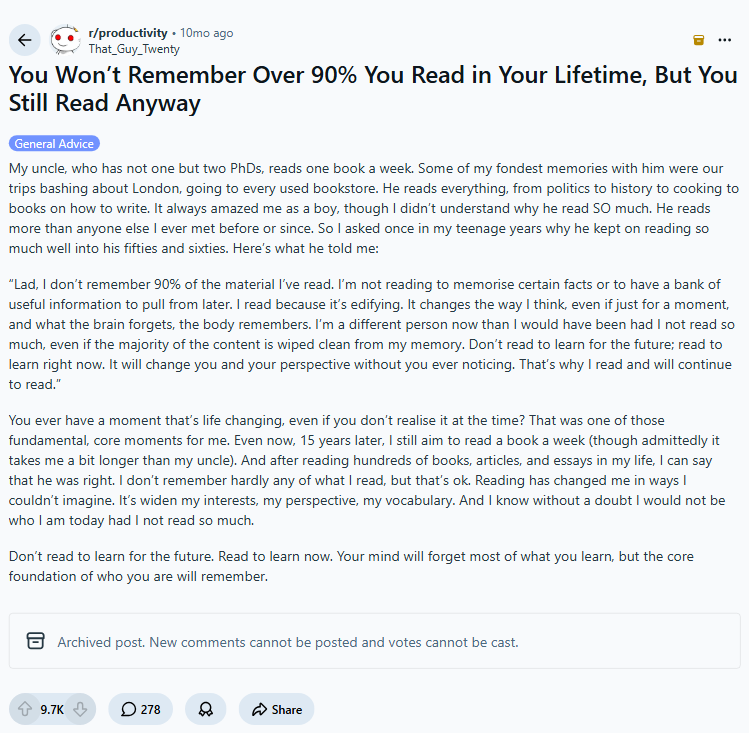
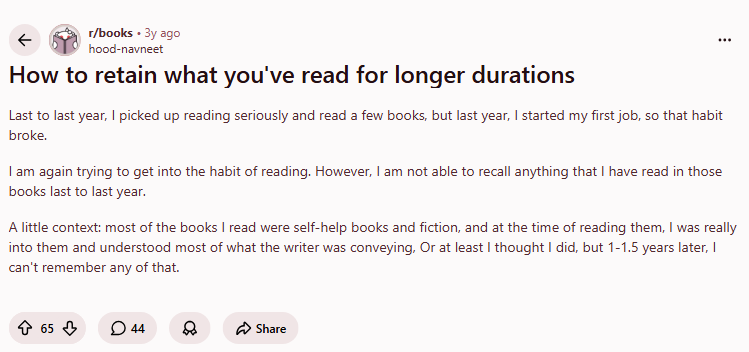
There is also a large, upvoted camp that pushes back on the whole premise: read to learn now, they say, and stop stressing about remembering every line. We actually like that take. It is why REPS is built to feel calm and playful instead of guilt-tripping you about everything you have forgotten. A few real threads worth reading yourself:
- "You won't remember over 90% of what you read" r/productivity, the forgetting-curve reality check
- "How to retain what you've read for longer durations" r/books, the core "why don't I remember this" thread
- "Anki alternatives? (Autumn 2024)" r/Anki, the honest alternatives discussion
These are real, unedited threads. We screenshot them and link them so you can read the full discussion and judge the consensus yourself.
The verdictHow to choose
- If you want the deepest engine and free, and you do not mind building cards: use Anki. It is the power tool and it earns the reputation.
- If you highlight everything and want one mature reading hub: use Readwise with Reader, and turn on Mastery so it actually tests you.
- If you mostly want to listen, on a generous free tier: use Matter. Best audio of the bunch.
- If you just need to file and organize: use Notion, and pair it with something that handles the remembering.
- If you want to save anything and have the remembering done for you, as a daily game: that is what we built REPS for. Get early access.
Frequently asked
Why do I forget most of what I read?
Reading once puts something in short-term memory, and the forgetting curve pulls most of it back out within days. What holds knowledge in place is active recall (pulling the idea back out of your head) on a spaced schedule (revisiting it right before you would forget). Highlighting and note-taking feel productive but skip the recall step, which is the part that actually makes it stick. Apps that only save and organize your reading do not close that loop; apps that test you on it do.
What is the best free app to remember what you read?
Anki is the strongest free option if you are willing to build your own flashcards; it is free on desktop and Android with a genuinely deep spaced-repetition engine. Matter has a generous free tier for saving and listening to articles, though it does not test recall. REPS is invite-only early access right now and is built so you never make a single card by hand.
What is the best app if I hate making flashcards?
If card-making is the part you dread, Readwise turns highlights you already made into active-recall questions through its Mastery feature, so you skip most of the manual work. REPS goes further: you save an article, video, or podcast and it generates the recall for you, then serves it back as a quick daily game. Neither asks you to sit down and author cards.
Does REPS work with articles, YouTube, and podcasts?
Yes. REPS is built to save anything you read, watch, or hear: articles and web pages, YouTube videos, PDFs and documents, images, and audio. It turns each into recall you can play through, and links everything into your Second Brain, a graph of what you know. Bring your own content instead of working through someone else's course.
Is spaced repetition actually worth the effort?
Spaced repetition is one of the most reliable ways to move something into long-term memory, because it schedules each review for the moment a memory is about to fade. The catch has always been the effort: classic tools make you build and maintain the schedule yourself. The apps worth your time in 2026 are the ones that handle the scheduling for you so all you have to do is show up for a couple of minutes.
I started building REPS after realizing I could not remember most of what I read. I use the apps on this list myself, and I write these comparisons to be the honest rundown I wish I had had.
